You can adjust the ringer volume of your handset according to the noise level of the surrounding environment. The ringer volume can be adjusted using the menu or the predefined shortcuts (left and right navigation keys) on the keypad when the handset is idle. The handset supports 5 different ringer volume levels. The default level is 3.
To adjust ringer volume using the predefined shortcuts:
1. Press  or
or  when the handset is idle.
Press  to decrease the ringer volume, or press
  to increase the ringer volume.
2. Press the Save soft key to accept the change or the Back soft key to cancel.
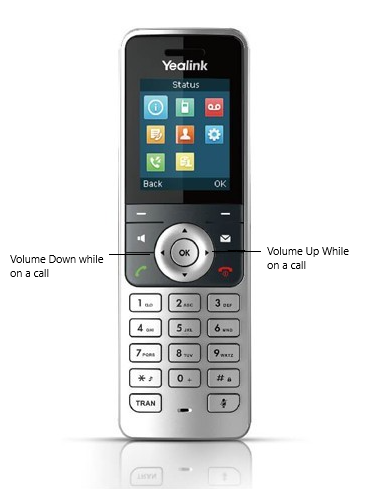
To adjust the call volume:
1. While on a call, press  or press
  to adjust the volume of the currently engaged audio devices (earpiece, headset or loudspeaker).
Was this article helpful?
That’s Great!
Thank you for your feedback
Sorry! We couldn't be helpful
Thank you for your feedback
Feedback sent
We appreciate your effort and will try to fix the article